
Pretty soon after setting up Ubuntu Studio on my laptop (which I plan to use for my music recording and composition) it became obvious that all was not well in JACK land. My excitement at everything ‘working out of the box’ was somewhat premature on this machine!
To headphone or not to headphone
The primary issue I was experiencing was with my audio - it seems to be my nemesis as this was what prompted me to switch to Ubuntu Studio in the first place!
The issue seemed to be with JACK, the default audio server, and surrounded the use of headphones … pretty vital if you don’t want to thoroughly annoy your partner and neighbours with constant click tracks and your amazing musical creations!
Every time I switched to headphones, any apps that were using Pulseaudio (Spotify, Chrome etc) would switch perfectly to and from the headset, both wired and Bluetooth. Ardour, however, absolutely REFUSED to play through my headphones, no matter what settings I changed.
Troubleshooting with Carla
Carla, a really awesome open source audio plugin host has a great feature called the Patchbay which allows you to see and modify all of the audio magic going on under the hood.
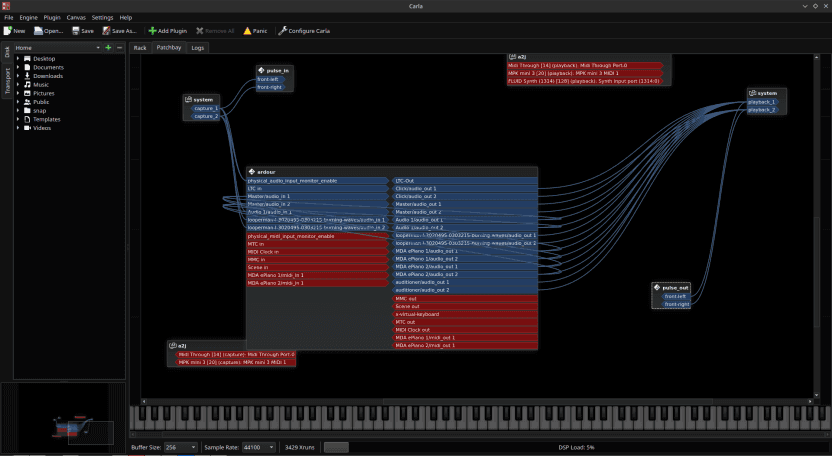
In my case, there was no differentiation between the audio that was coming from the likes of Spotify, Chrome etc at all - and nothing I did seemed to make the audio from Ardour route correctly from the laptop speakers to my headphones, either wired or Bluetooth.
After hours of troubleshooting (thanks to the awesome folks in Unfa’s community) I was still no closer to getting this working.
Recently, Unfa (the font of all Ardour knowledge!) had shared a video of switching from JACK to Pipewire and having it ‘just work’, so I figured it would be worth a shot!
Switching from JACK/Pulseaudio to Pipewire
Before starting - take a backup!
I followed the tutorial here mostly so there’s no point me repeating it again, go check it out! Do watch out for some of the other tutorials which talk about using PPAs, I started down that route and it did not end well!
The tutorial saw me through basically everything that I needed with the exception that I needed to run these commands after step 3:
systemctl --user --now disable pulseaudio.service pulseaudio.socket - this shuts down Pulseaudio
systemctl --user --now enable pipewire pipewire-pulse - this starts Pipewire
This got Pipewire up and running for me - you can use the command pw-top to check out the pipewire node and device statistics.
And our survey says …
After a few reboots (the usual ‘did you switch it off and on again’ teaching applies even to geeks!) I fired up all the apps and started to test what was working and what was broken.
Guess what?
IT WAS ALL WORKING!
With my headphones plugged in, every app using audio could play at the same time, and it was all coming through to my headphones. I did have to set the output device for Ardour, but once that was done, everything was working perfectly.
Disconnecting my headphones, everything seamlessly transferred to my laptop speakers and continued to work.
Connecting the headphones with Bluetooth, everything seamlessly transferred to the headphones, and back to the speakers when I disconnected.
HURRAH!
Further, looking back at Carla, each application now had its own node with the connections being shown, which is what I think should have been happening all along with JACK.
Added bonus
As an added bonus, with JACK I had quite bad latency resulting in crackly audio and the occasional glitch, which I assumed to be due to old hardware (although to be honest, the XPS 15 is still a pretty good spec given its age!) however as soon as I switched over to Pipewire the xruns (where the system is not processing the buffers in time) basically dropped to almost nothing.
It’s no surprise to me that Pipewire is going to ship as the default audio server in Ubuntu 22.10 - so far everything is running like a dream since I switched!



0 comments
No comments yet - be the first.